Deciding a file structure of any application is always a pain for new developers
File structure decisions are one of the first things that paralyze new developers. There's no universally correct answer, but there are well-established patterns worth learning before you deviate from them.
Here's a structure that works well for Node.js and Express applications:
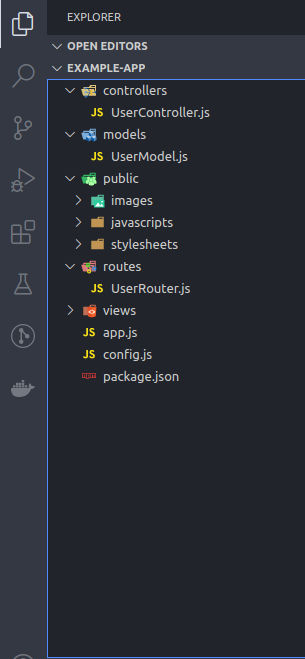
app.js
controllers/
models/
public/
routes/
views/
config.js
What Each Part Does
app.js The entry point. Starts the web server and contains setup logic: middleware registration, database connections, and route mounting. Keep it thin — it wires things together but doesn't do work itself.
controllers/
Business logic. One file per area of functionality: UserController.js, AnalyticsController.js, etc. Controllers receive requests from routes and decide what happens.
models/
Database models. Separate files per data entity: UserModel.js, ProductModel.js. Models handle all data access — queries, validation, relationships.
public/
Static assets served directly to the client: images, client-side JavaScript, CSS. Organized by type inside (e.g. public/images/, public/css/).
routes/
Routing logic divided by functionality: UserRouter.js, ProductRouter.js. Routes map URLs to the appropriate controller method. Keep routing logic out of controllers.
views/ HTML or EJS templates for server-side rendering. If you're building a REST API with a separate frontend, omit this folder entirely.
config.js
Configuration variables — PORT, database connection strings, API keys, secrets. Never commit this to Git. Use environment variables and a .env file instead.
The Principle Behind It
Each folder has one responsibility. A controller shouldn't touch the database directly. A model shouldn't know about HTTP. A route file shouldn't contain business logic. When something goes wrong, this separation tells you exactly where to look.
This is one author's preference, not an enforced standard. Once you understand why this structure exists, you'll know when to adapt it.